AI-Powered Travel Guide Mobile Application
About Project
Introduction
Developed in parallel with the changing travel habits of today, the mobile application called “Travel Guide” aims to simplify and enhance users’ travel experiences. With its user-friendly interface and comprehensive features, this application is designed to meet the needs of travel enthusiasts and make traveling more enjoyable. While allowing users to share their experiences about the places they visit, the app also facilitates travel planning through features such as an AI-powered country information page and an integrated Chatbot.
Methodology and Approach
This project is based on the MVVM (Model-View-ViewModel) architecture in order to increase development efficiency and create a more modular and maintainable code structure. The MVVM architecture separates each user interface component (View) from the business logic, resulting in a cleaner and more organized structure. This approach clearly defines the relationship between the user interface and business logic throughout the project.
In addition to MVVM, the overall project structure follows clean code and sustainability principles. The codebase is organized into separate folders based on responsibility, ensuring that each part of the application has a clearly defined role. This structure significantly improves readability and long-term maintainability.
The application consists of Model, ViewModel, and View layers. The Model layer contains the application’s data models, each representing a specific data structure. The ViewModel layer includes classes that manage UI-related data processing and provide the necessary data to the View. The View layer contains UI components such as Activities, Fragments, and XML layout files where the interface is rendered.
Additionally, the Repository pattern is used for data handling. Repository classes are responsible for accessing data sources and managing business logic, enabling communication with external sources such as Firebase databases and API services. The project also includes a Service layer for interacting with external services and a Utils layer that contains helper functions and utility tools. These layers form the backbone of the project architecture and ensure a clean, readable, and maintainable codebase.
Technologies Used
The application was developed for the Android platform using Android Studio as the official integrated development environment. The project adopts the MVVM architecture and primarily uses Kotlin as the programming language.
For database management, Firebase is utilized. Firebase Authentication is used for user authentication, Realtime Database for data storage, and Firebase Storage for handling large data such as media files.
The project integrates external APIs, including the RestCountries API for country-related data and the Google Gemini API for AI-powered features. Retrofit and JSON Converter libraries are used for API communication and data parsing.
Version control and collaboration are managed using Git and GitHub. Considering the global target audience, multi-language support is implemented as a key feature of the application.
Application Interface
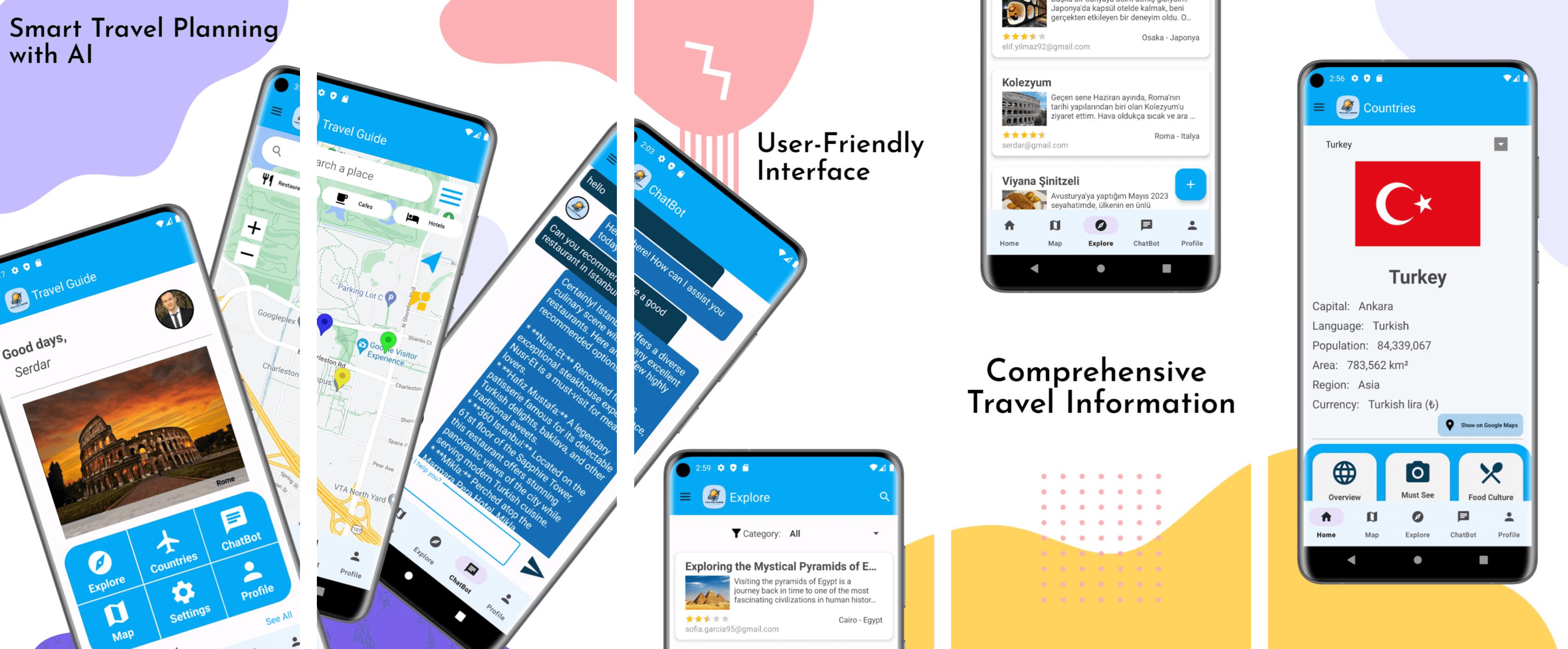
The application interface is carefully designed with a strong focus on usability and functionality. All screens are interconnected to ensure a smooth and intuitive user experience. Users interact with various screens such as Login, Register, Forgot Password, Home, Explore, Post Detail, Add Post, Edit Post, Countries, ChatBot, Map, Profile, Edit Profile, and Settings.
To improve navigation, the application includes both a Drawer Menu and a Bottom Navigation Bar, allowing users to move quickly and easily within the app. The Register screen enables new users to sign up by providing basic information such as name, surname, and email address. The Login screen allows registered users to access the application using their credentials, while the Forgot Password screen sends a password reset link to the user’s email address.
Starting from the Home screen, users can view their profile information, browse city photos via an image slider, and quickly access recently added posts. The Explore page allows users to filter posts by categories, while the Post Detail page provides in-depth information about each post. Users can create or update content through the Add Post and Edit Post screens.
The Countries page presents detailed country information enriched with data from the RestCountries API. The ChatBot page provides quick responses to user questions using AI integration. On the Map page, users can explore locations through Google Maps and Places API integration. Profile and Edit Profile screens allow easy management of personal information, while the Settings page enables language selection and password updates.
This comprehensive and integrated interface design ensures that users can efficiently and enjoyably navigate the application.
Results
TravelGuide is an application that adapts to users’ travel habits and simplifies their overall travel experience. It offers features such as map integrations and an AI-powered chatbot. Users can share their travel experiences on a dedicated page, helping others make more informed travel plans. While the initially planned features have been successfully implemented, TravelGuide continues to evolve with ongoing improvements and new features, further enhancing its potential and overall user experience.