AI-Powered Travel Guide Mobile App: Architecture & Technical Deep Dive
A bachelor thesis project - an Android travel guide app built with Kotlin, MVVM, and Firebase, featuring AI-powered recommendations and a chatbot via Google Gemini API.
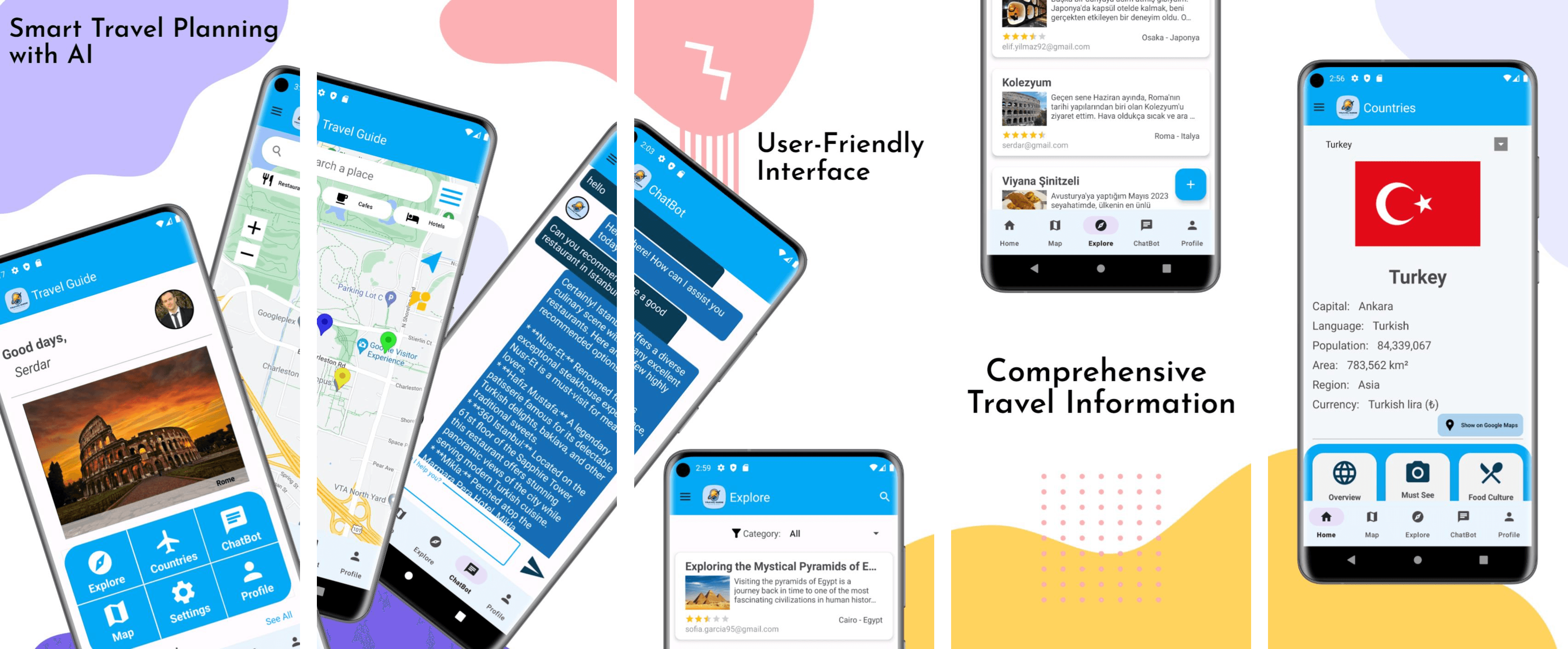
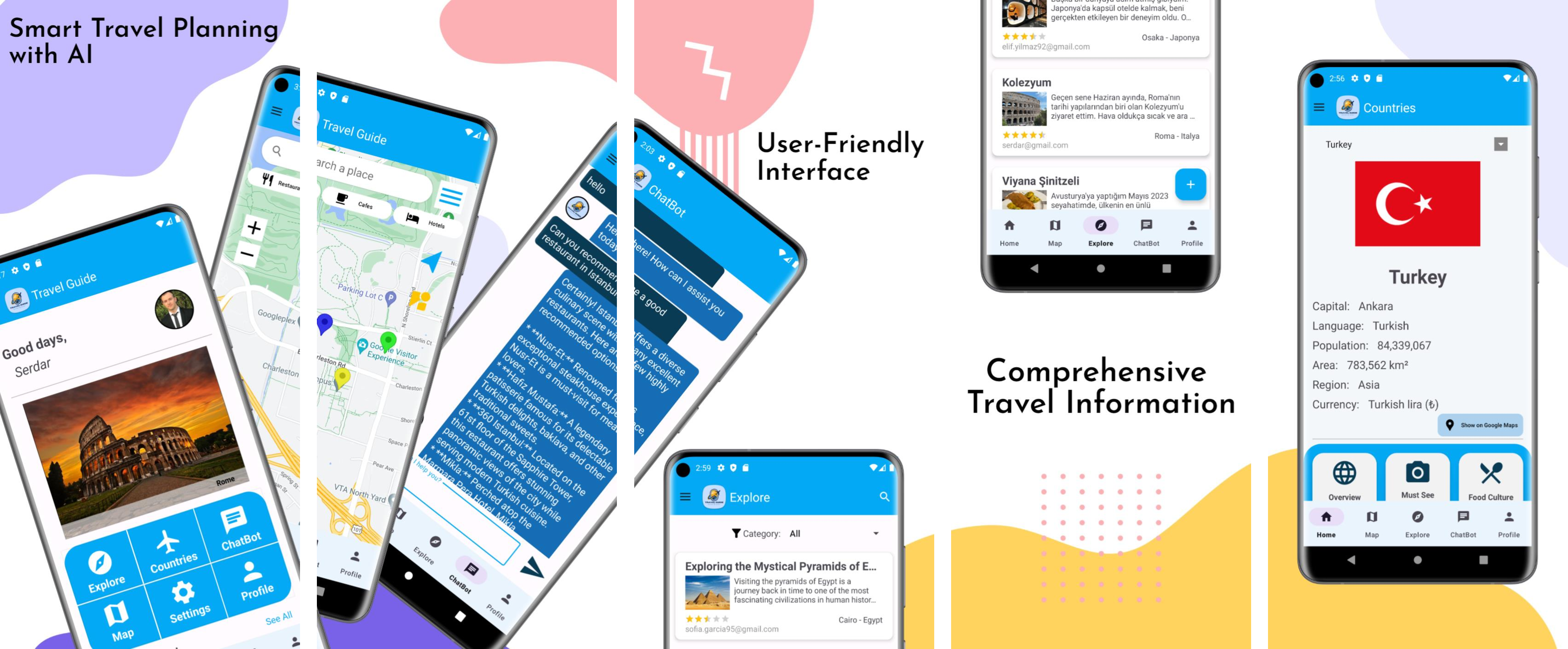
This is my bachelor thesis project: an AI-powered Android travel guide application built to help travelers plan trips, discover destinations, and share their experiences with other users.
Motivation
Travel habits have shifted dramatically with mobile technology. Where travelers once relied on paper maps and local guesswork, they can now access detailed destination information before departure and get real-time answers to questions during the trip itself. Travel Guide was built around this shift - bringing route planning, destination knowledge, local recommendations, and a community of fellow travelers together into a single app, with AI woven through nearly every feature rather than bolted on as an afterthought.
System Architecture (MVVM)
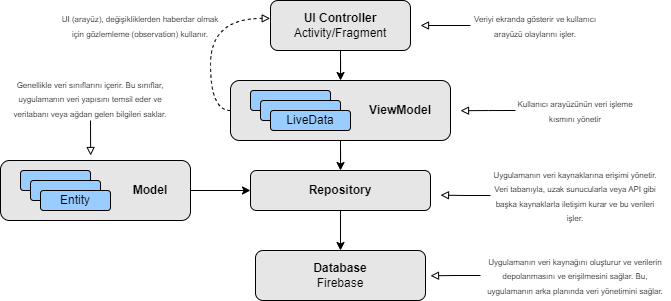
The project follows the MVVM (Model-View-ViewModel) pattern, chosen specifically to separate UI logic from business logic and keep the codebase testable and maintainable as features grew. Code is organized into six clearly separated layers:
- Model: data classes representing the app's core entities -
Country,Explore(user-shared travel posts),Profile, andUser. - Repository: the single source of truth for each data domain, mediating between data sources (Firebase, REST APIs) and the rest of the app -
AuthRepository,ExploreRepository,ProfileRepository,CountryRepository. - ViewModel: holds UI state and business logic per feature, communicating exclusively with repositories rather than data sources directly -
AuthViewModel,ExploreViewModel,ProfileViewModel,CountryViewModel. - Service: handles external API communication, built around Retrofit (
CountriesAPI,RetrofitClient). - Utils: reusable helper classes (
ApiUtilsfor API configuration,DateUtilsfor date/time handling). - View: Activities, Fragments, and XML layouts - the only layer that directly renders UI.
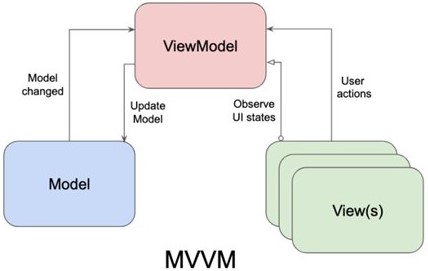
Data flows in a single, predictable direction: a user interaction in the View is passed to the ViewModel, which requests or updates data through the Repository, which in turn talks to Firebase or a REST API. The result flows back up through the ViewModel to update the View. Keeping this direction consistent across every feature made the codebase far easier to reason about and extend as new screens were added.
Technology Stack
- Platform: Android, built and tested in Android Studio, Google's official IDE.
- Language: Kotlin - chosen for its concise, null-safe syntax and full interoperability with Java, and officially recommended by Google for Android development since 2017.
- Database: Firebase, used across three of its products:
- Firebase Authentication for secure sign-up/login, handling email and password validation and secure credential storage.
- Realtime Database for live-synced data - primarily the Explore posts (title, country, place, category, rating, user email, photo link) and user profiles, both updating instantly across devices as changes are made.
- Firebase Storage for larger binary files - specifically profile photos and post images.
- Networking: Retrofit for type-safe REST API calls (GET/POST/PUT/DELETE) with automatic JSON-to-object conversion, paired with Picasso for efficient image loading, memory-aware caching, and disk caching of remote images.
- Version control: Git, with the project hosted and tracked on GitHub throughout development.

APIs in Detail
- Google Gemini API: the core of the app's AI features. User prompts (built dynamically from a selected country + category, or typed directly into the chatbot) are sent to Gemini, which returns a generated response rendered directly in the UI - in whichever language the user wrote in.
- RestCountries API: supplies structured data for every country in the world - name, flag, capital, population, area, region, and currency - powering the Countries screen's info panel.
- Google Maps API: renders the in-app map, supports switching between normal/hybrid/satellite/terrain views, and provides street view for any pinned location.
- Google Places API: powers place search and nearby-amenity discovery (restaurants, cafes, hotels) directly on the map.

Walkthrough of Key Screens
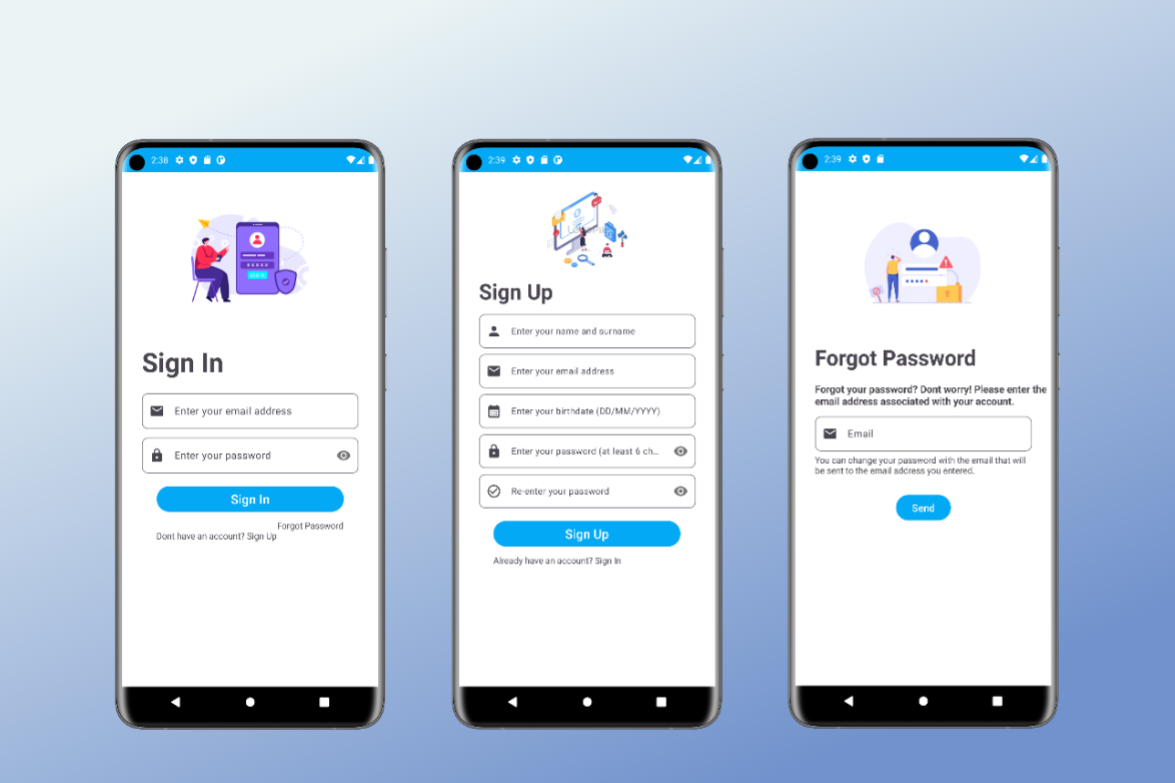
Authentication flow: sign-in validates credentials against Firebase Auth with clear error messaging; sign-up collects name, email, birthdate (via a date picker), and a password (minimum 6 characters, confirmed twice); forgot-password sends a reset link to the user's email.
Home: greets the logged-in user by name, displays a destination photo slider, a shortcut menu to every major section, and a "Recently Added" preview of the five newest community posts.
Explore: the main feed of user-shared travel posts, filterable by seven categories (All, History & Culture, Transport & Lodging, Food, Nature & Adventure, Entertainment, Experience) or searchable by keyword across titles and locations. Tapping a post opens its detail view; tapping the author's email opens their profile. A floating action button opens the post-creation screen.
Post detail / add / edit: the detail screen shows the full post - author, photo, title, category, description, rating, date, and location. The add/edit screens share a layout: optional photo upload, title, country, place, category (via dropdown), free-text description, and a star rating for how strongly the poster recommends the place.
Countries: pick any country from a dropdown (populated via RestCountries) to see its flag, capital, language, population, area, region, and currency, plus a "Show on Google Maps" shortcut. Below that, 12 categories (overview, must-see spots, food culture, and more) each trigger a fresh Gemini-generated summary for the selected country + category combination.
AI Chatbot: a persistent assistant that answers any travel-related question, responding in whatever language the user types in - powered end-to-end by the Gemini API, with the conversation held in memory for the session.
Map: search any place via Google Places, switch map type, view nearby restaurants/cafes/hotels with one tap, zoom, and jump to the user's live location. Tapping a spot drops a marker with street-view access; long-pressing saves a marker locally for later reference.
Profile & Settings: profile shows the user's photo, bio, post count, and age, with inline edit/delete on their own posts. Settings houses language switching (from five supported languages), password change via email, and logout.
Navigation: both a drawer menu (full feature list) and a bottom navigation bar (the five most-used screens: Home, Map, Explore, ChatBot, Profile) are available so users can reach any screen in one or two taps.
Multi-language Support
Since travel apps serve a global audience by nature, the app supports five languages: English, Turkish, German, Spanish, and French, covering UI text, labels, and error messages - with more languages planned for future updates.
Conclusion
Travel Guide brings together destination data, AI-generated recommendations, community-shared experiences, and map tools into a single, cohesive mobile app. Building it end-to-end - from Firebase data modeling to Gemini prompt design to a full MVVM architecture spanning six layers - was a comprehensive exercise in mobile software engineering, and remains the foundation for how I approach app architecture today.